


















For a construction or renovation service, your website is often where potential clients first learn about your work. They want to see the services you provide, look at projects you have completed, learn about your company, and find an easy way to discuss their own project with you.
A well-organized website makes that information easier to find. You can use dedicated sections to introduce your services, display previous projects, share testimonials, answer common questions, and guide visitors toward contacting your team or requesting a quote.
Choosing a theme made for construction websites can also make the setup easier. With a general business theme, you may still need to create many of these sections yourself, including service layouts, project showcases, company details, FAQs, and inquiry forms.
Renovater gives you a ready-made theme for making this type of website. Its construction-focused layout already provides space for your services, projects, company information, testimonials, FAQs, and contact details. You can then replace the demo content with information and images from your own business instead of planning the entire website structure from zero.
Why a Building and Construction Company Website Needs the Right Theme
People usually visit a construction company website because they are looking for someone they can trust with a real project. They want to understand what your company does, see examples of your work, and decide whether they should contact you.
For example, a homeowner may need help with a renovation. A property manager may be looking for a reliable contractor. A business owner may want to compare companies for a commercial project. Each visitor comes with different needs, but they often look for the same basic information.
Before they contact you, they may want to know:
Your website should make these answers easy to find. A general business theme may give you a professional-looking homepage, but you may still need to create service sections, project galleries, company details, FAQs, quote forms, and contact sections yourself.
A construction-focused WordPress theme gives you a more suitable starting point. It already organizes the website around the information potential clients usually want to see, so you can spend more time adding your real services, projects, and business details instead of planning every section from a blank page.
What to Look for in a Building and Construction Company WordPress Theme
When you choose a WordPress theme for a building and construction business, don’t focus only on how the demo looks. The theme should also help visitors understand your services, see your previous work, trust your company, and contact you easily.
Clear Service Sections
Building and construction companies often offer more than one type of service. You may provide building construction, renovation, engineering, interior work, land clearing, repair services, remodeling, material supply, or project management.
Your website should make these services easy to find and understand. Visitors should be able to quickly see whether you offer the service they need.
A good construction theme should give you space to show each service with a clear title, short description, image or icon, and a link to more information.
Project Showcase Sections
Potential clients usually want to see examples of work you have already completed. Project photos can show the type of buildings, renovations, interiors, or other construction work your company handles.
A project section makes it easier to show this experience visually instead of only telling visitors that you provide quality work.
Whenever possible, use photos from your real projects. You can also add useful details such as the project type, location, scope of work, or before-and-after results.
Trust and Credibility Sections
Construction projects often involve a large budget and long-term planning, so potential clients need to feel confident before they contact you.
Your website should give you space to show details that help build that trust. You can include your years of experience, completed projects, licenses or certifications, company or team information, client testimonials, and construction specialties.
You should also make your business address and contact details easy to find. Always replace demo content with real information from your company, because accurate details will build more trust than impressive numbers that do not represent your business.
Easy Contact on Mobile
Many potential clients may first visit your website from a phone. They should be able to find your phone number, email, address, and contact button without searching through several pages.
Keep your inquiry form simple as well. You can ask for basic information such as the visitor’s name, email, phone number, project type, location, and a short description of the project.
This makes it easier for people to contact you when they are ready to discuss their construction needs.
Full Site Editing Support
A construction website will not stay the same forever. You may need to add a new service, replace project photos, update company information, or publish new project content.
Full Site Editing makes these updates easier because you can edit more parts of your website directly inside the WordPress editor. This includes pages, templates, headers, footers, and other site sections.
With this type of editing setup, you can keep your construction website updated without rebuilding the entire layout every time you need to change something.
Renovater: A Free WordPress theme for Building and Construction Company
Renovater is a free WordPress block theme for construction companies, contractors, renovation businesses, builders, architecture firms, engineering companies, and home improvement services. It comes with ready-made pages and sections for construction services, featured projects, company information, testimonials, FAQs, blog content, and contact details.
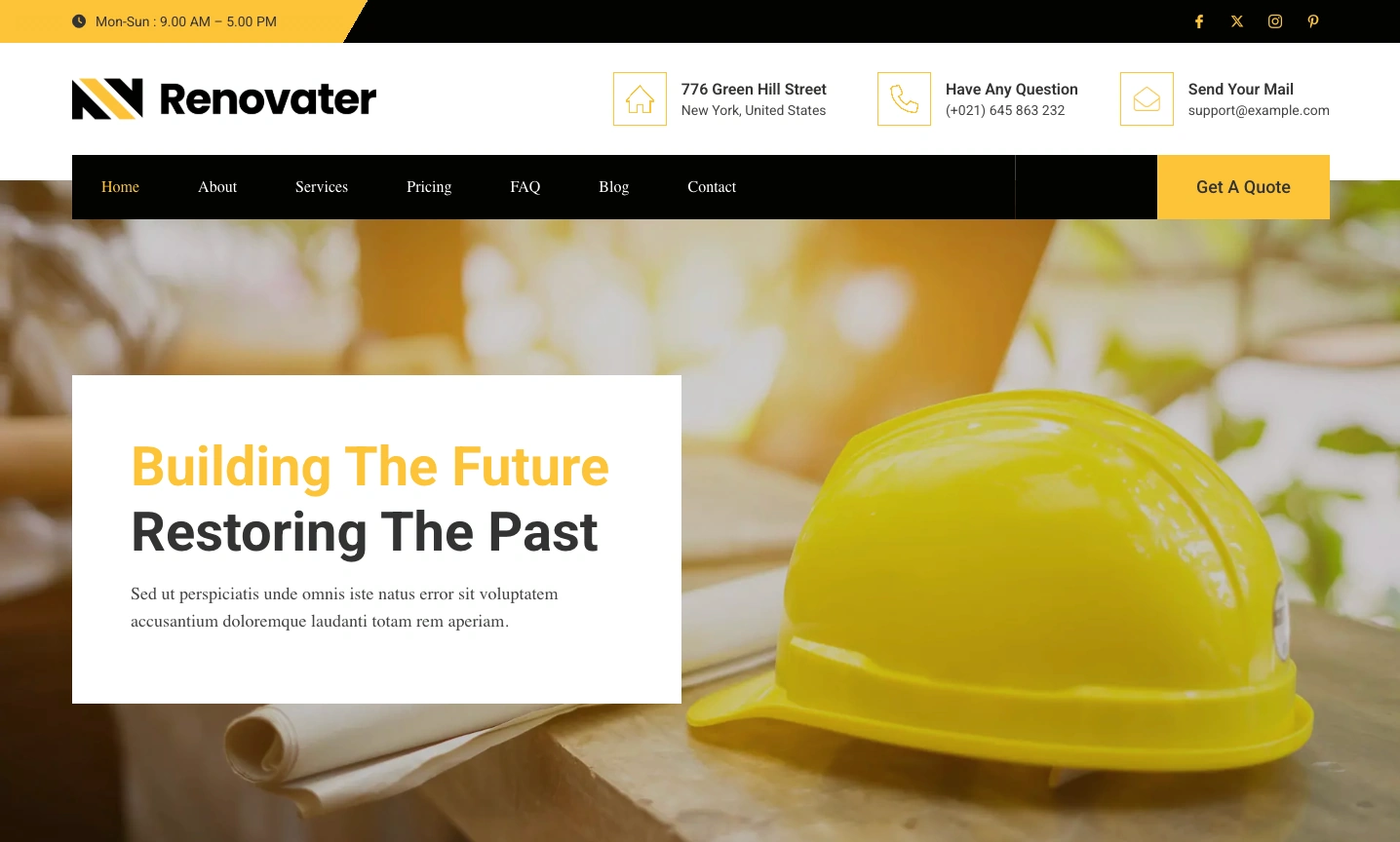
Renovater also supports Full Site Editing and the WordPress Block Editor, so you can customize your construction website with WordPress blocks. You can update pages, templates, the header, footer, project sections, service content, and other parts of the website directly from WordPress.
What Is Included in Renovater
Renovater gives you a ready-made website structure for construction companies, contractors, renovation businesses, builders, and other related services. Instead of creating every page and section from the beginning, you can start with a construction-focused layout and replace the demo content with your own business information.
The homepage starts with a hero section that introduces your company and gives visitors a clear next step. The demo uses the headline “Building The Future” and “Restoring The Past” with a Contact Us button. You can replace it with a message that better describes your business, such as “Reliable Construction for Homes and Businesses,” “Professional Home Renovation Services,” or “Commercial Building Services From Start to Finish.”
The service section helps you explain the type of construction work you provide. The demo includes Consultation, Building Engineering, House Renovation, and Interior Design. You can keep those services or change them to match your company, such as Residential Construction, Commercial Construction, Building Maintenance, Structural Repair, Roofing, Project Consultation, or Material Supply.
Renovater also gives you a Featured Works section for showing completed projects. The demo includes categories such as Building Construction, House Renovation, Land Clearing, Wall Finishing, Industrial Construction, and Material Supply. You can replace these with your own project categories and add real photos, project locations, work details, or before-and-after results to show visitors what your team has completed.
The homepage also includes sections for testimonials and FAQs. You can use testimonials to share feedback from previous clients, while the FAQ section can answer common questions about your services, quotes, project process, site visits, payment stages, or the types of construction work you accept. This gives potential clients more information before they decide to contact you.
Who Can Use Renovater?
Renovater works well for businesses that want a construction-focused website without building the entire layout from scratch. You can use it if you run a:
The theme can also help smaller contractors or local construction businesses that currently depend on referrals, social media, or messaging apps to find clients. A website gives you one place to explain your services, show completed projects, introduce your company, share testimonials, and make it easier for potential clients to request a quote.
How to Install Renovater Theme
The installation process is simple and works the same way for both themes. You can install them through the Gutenverse dashboard or directly from the WordPress theme directory.
Option 1: Through the Gutenverse Dashboard
Option 2: Directly From WordPress
For a full step-by-step visual guide, WordPress.org check the Gutenverse theme installation guide.
Once you activate the theme, open the WordPress Site Editor and start replacing the demo content with your own. Add your company information, real project photos, construction services, and contact details. Since this theme already provides the main website structure, you can focus on customizing the content to match your business.
How to Improve Your Building and Construction Website After Installing Renovater
The theme gives you the basic website structure, but you still need to customize the content so it represents your construction business.
Replace the Demo Content
Start by replacing all demo content with information from your own company. Update the sample headlines, descriptions, statistics, testimonials, addresses, phone numbers, and other placeholder content.
Add your real construction services, project photos, company information, and contact details. This helps visitors understand who you are and what kind of work you actually provide.
Use Photos from Your Real Projects
Real project photos can make your website more convincing. Instead of relying only on stock images, show completed projects, work in progress, before-and-after results, site photos, or your team working on a project.
You can also add a short description to each project. Mention the type of work, location, project scope, or other useful details that help visitors understand what your company handled.
Make It Easy to Request a Quote
Potential clients should be able to contact you without searching through the website. Add clear calls to action throughout your pages, such as Request a Quote, Book a Consultation, Discuss Your Project, Contact Our Team, or Request a Site Visit.
Keep the inquiry form simple as well. Ask only for the information you need to start the conversation, such as the client’s name, contact details, project type, location, and a short description of the work.
Start With the Pages You Need
You don’t need to build a large website from the beginning. Start with the most important pages, such as Home, Services, Projects, About, FAQ, and Contact. These pages are usually enough to introduce your business, show your work, and give potential clients a way to reach you.
As your business grows, you can add more pages for pricing, team information, detailed project case studies, blog posts, or specific construction services. If you need extra layouts or sections, you can also use the Gutenverse Template Library to expand your website without designing everything from scratch.
Need More Than Just a Front Page Template?
The free version of Renovater gives you a professionally designed front page template that you can customize with your own content. You can also use the standard WordPress block templates for other basic parts of your website.
If you want to build a more complete website, you can upgrade to Renovater PRO. The PRO version gives you access to a full set of matching templates for pages such as About, Services, Projects, and Contact.
This can save you time if you want to create a complete multi-page construction website without designing each page from scratch. It can also be useful for agencies that need to build client websites more efficiently.
You can learn more about the available plans and features on the Gutenverse pricing page.
FAQ
Renovater is a good option for construction and building company websites because it already includes sections for services, completed projects, company information, testimonials, FAQs, blog posts, and contact details.
Yes. You can download Renovater for free from WordPress.org. If you need more ready-made pages and templates, you can use Renovater PRO to access the complete template set for building a more complete website.
Yes. Renovater supports Full Site Editing, so you can customize pages, sections, templates, colors, logos, menus, and other website content directly in WordPress without writing code.
No. Renovater doesn’t include a built-in quote or project management system. However, you can use Gutenverse Form to create inquiry or quote request forms and collect information from potential clients, such as their contact details, project type, location, budget, and project requirements.
Yes. Renovater works well for renovation businesses, contractors, builders, construction companies, architects, engineering firms, and home improvement services.
Ready to Build Your Construction Company Website?
Your construction website should make it easy for potential clients to understand what you do, see examples of your work, learn more about your company, and contact you when they are ready to start a project.
Renovater gives you a ready-made structure for that. It includes sections for construction services, completed projects, testimonials, FAQs, company information, and contact details, so you don’t need to build the whole website from zero.
If you are about to building a website for a contractor, construction company, renovation business, builder, architecture firm, engineering service, or home improvement company, you can try download Renovater theme and customize it with your own needs.