Your WordPress website is live. The layout looks clean, the content is ready, and everything appears fine in the editor. However, when you open the website in a browser, it may still feel a little flat.
Each section stays still. Nothing fades in, slides into view, or responds as visitors scroll down the page. Without these small movements, your website may feel less engaging or polished.
Well-placed animations can make a noticeable difference. According to the Nielsen Norman Group, subtle animations can confirm user actions, guide attention, and make a website easier to use. They can also help important content stand out without distracting visitors.
You can add these effects without writing custom CSS. Many WordPress animation plugins work with popular page builders and editors, making it easy to add motion to different parts of your website.
In this article, we will explore some of the best WordPress animation plugins and explain what to consider before installing one.
What to Look for in a WordPress Animation Plugin
WordPress animation plugins offer different features and controls. Before you install one, consider these four points:
Best WordPress Animation Plugins to Try in 2026
The right animation plugin depends on the effects you want to create and the editor you use. Some plugins add simple entrance effects, while others support scroll-based storytelling, advanced interactions, animated sliders, or complete page-building tools.
Below are four WordPress animation plugins worth considering in 2026.
1. Gutenverse
Many animation plugins focus on one type of effect. However, you may need a more complete system when you want elements to move with purpose, sections to appear at the right time, and images to respond smoothly to user actions.
Gutenverse provides that system directly inside the WordPress Block Editor. It extends Gutenberg with custom blocks, templates, layout controls, and animation tools. You can build your pages and manage animations from the same editor instead of adding a separate animation tool.
To expand these capabilities, Gutenverse PRO adds nine advanced animation types such as:
You can configure every effect from the Advanced Animation panel in the block sidebar. You don’t need custom code or a separate animation editor.
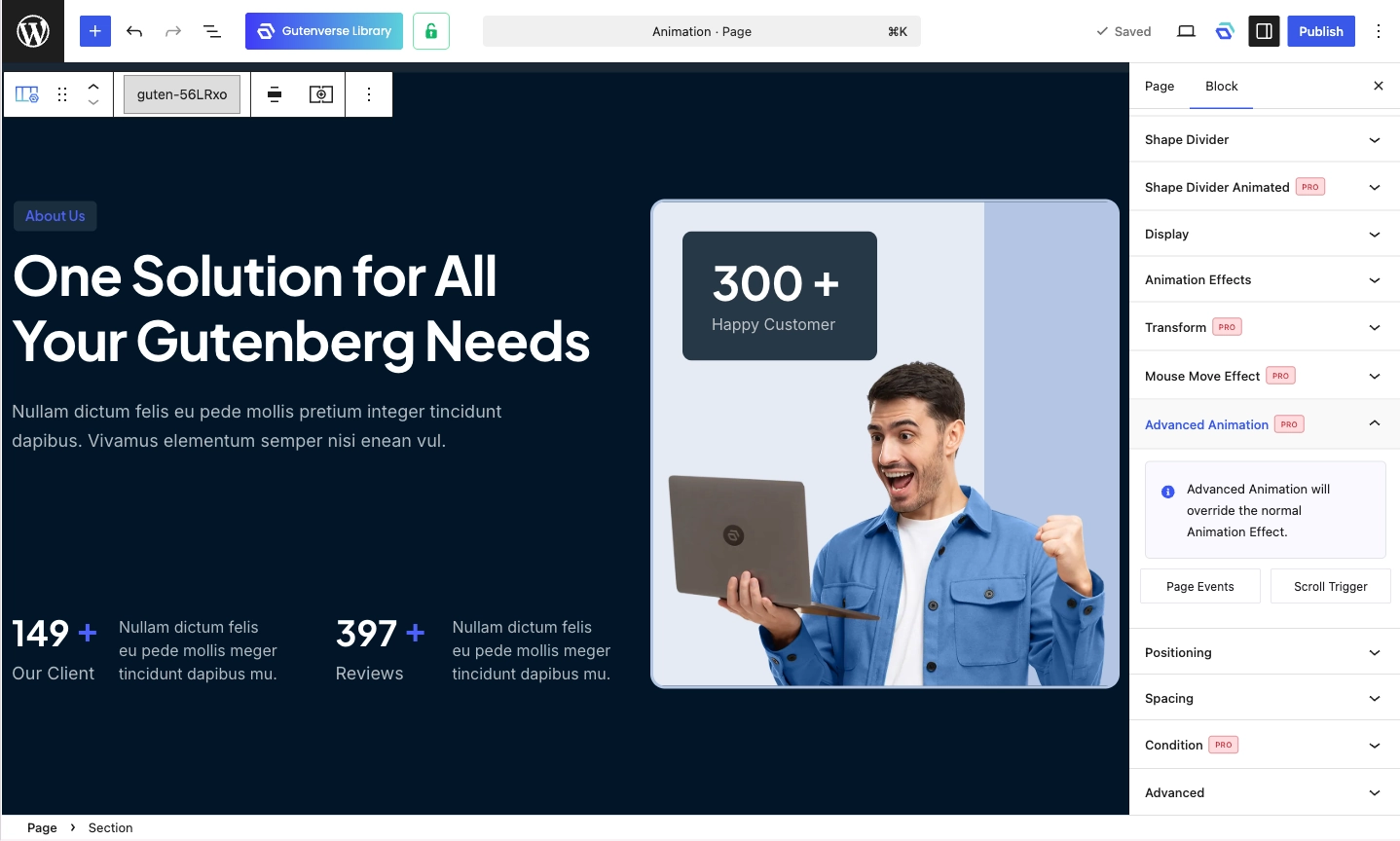
Gutenverse also supports several trigger types:
For scroll-based effects, Gutenverse uses animation anchors. The anchor sets the reference point where an animation begins, giving you more control over its timing.
You can also enable or disable each animation on desktop, tablet, and mobile. For example, you can keep a scale effect on desktop while disabling it on smaller screens.
Gutenverse PRO includes the advanced animation system and starts at $69 per year. It is a good option for users who want to build layouts, adjust responsive settings, and add animations within the same WordPress builder.
2. Motion.page
Motion.page is a visual animation builder that lets you animate WordPress websites without manually coding every interaction. It supports scroll effects, page transitions, hover interactions, gestures, timelines, staggered effects, custom cursors, SVG drawing, and text animations.
Its main advantage is flexibility. You can select website elements, assign triggers, control timing, and build detailed animation sequences. This gives you more freedom than plugins that only provide simple fade or slide effects.
This plugin can suit creative agencies, portfolio websites, product landing pages, and promotional campaigns. It is especially useful when motion plays an important role in the overall experience.
However, beginners may find it more complex than a standard animation plugin. You still need to understand triggers, selectors, timelines, and animation timing. You must also avoid adding too much movement to one page.
Pricing: Start from €149 per year.
3. Scrollsequence
Scrollsequence focuses on one specific animation style. It displays a sequence of images as visitors scroll down the page, creating a frame-by-frame storytelling effect.
You can use it for product reveals, app demonstrations, process explanations, architecture presentations, and campaign pages. For example, you can make a product rotate, assemble, zoom, or change its appearance as the visitor scrolls.
Scrollsequence supports Gutenberg, Elementor, Oxygen, Divi, Beaver Builder, and several other WordPress page builders. This broad compatibility makes it useful when scroll storytelling matters more than your editing workflow.
However, it isn’t designed for every type of animation. It may not be the right choice when you only need hover effects, animated buttons, or simple entrance animations.
Pricing: Start from $95.88 per year.
4. Slider Revolution
Slider Revolution is a well-known WordPress plugin for creating motion-focused sections. It works as a visual content builder for animated sliders, homepage heroes, carousels, banners, and landing-page modules.
Its visual editor gives you control over layers, timing, movement, and responsive behavior. It also provides templates and add-ons that can help you create polished animated sections more quickly.
Slider Revolution works best when one section needs to make a strong visual impression. You can use it for a homepage hero, product showcase, campaign banner, or interactive carousel.
However, it may feel excessive for websites that only need a few subtle scroll effects. It adds a separate workflow and may introduce more features than a simple website needs.
Pricing: Start from $49.95 per year.