A good photography website should let your images speak for themselves. But it still needs more than a beautiful gallery. Visitors should understand your style, the type of photography you offer, how to explore your work, and how to contact you for a project.
That’s why you should choose a theme that fits a photography website. A general business theme may only give you a basic layout. You may need to build the gallery, portfolio, and profile sections yourself. A free photography WordPress theme gives you a better starting point because it already includes sections made to show photos clearly.
Photology theme makes it easier to build your photography website. This free WordPress block theme is made for photographers, photography lovers, visual storytellers, portfolio creators, and other creative professionals. It helps you build a clean and visual website that presents your photos, photography style, portfolio categories, personal profile, and contact information clearly, so visitors can explore your work and contact you more easily.
Why a Photography Website Needs the Specific Theme
A photography website has a different purpose from a regular business website. Visitors do not only read your offer. They also look at your visual style, consistency, experience, and whether your work feels right for them.
A good photography website should answer a few simple questions such as:
If visitors cannot find these answers easily, even strong photos may lose their impact. They may like one photo, but still leave because they do not know what to do next.
This’s why a niche WordPress block theme can help you. Instead of building the full website structure from scratch, you can start with a layout made for photographers. It already supports important parts like images, spacing, contrast, portfolio sections, and galleries.
What to Look for in a Free Photography WordPress Theme
Not every free WordPress theme is good for a photography website. Some themes may look nice, but they are not made to show photos, portfolios, or creative work clearly.
Before choosing a photography theme, here are the main things you should look for.
Image-Focused Layouts
A photography website should make your photos the main focus. The theme should have large image sections, gallery layouts, portfolio areas, and simple text sections.
This helps visitors enjoy your photos without getting distracted by too much text or a messy layout.
Clear Portfolio Structure
Your portfolio should be easy to browse. Visitors may want to see your wedding photos, portrait photos, product photos, or other types of work.
A good photography theme should help you organize your photos into clear sections or pages. This makes it easier for visitors to find the type of work they want to see.
If you need more guidance, this guide on how to add a gallery section to your WordPress portfolio page can help you understand how to organize your portfolio better.
Full Site Editing Support
Full Site Editing lets you customize your website directly inside WordPress. You can edit your header, footer, page layout, templates, and other site parts using blocks.
This is useful for photographers because you may want to change your menu, update your portfolio page, edit your contact details, or create a page for a photography service.
You can also read Gutenverse‘s guide on how to create and use templates to learn how templates work in WordPress.
Responsive Design
Many visitors will open your photography website from their phone. They may find you from Instagram, Google, a referral link, or another platform.
That’s why your theme should look good on mobile. Your photos should stay clear, your text should be easy to read, and your contact buttons should be easy to tap.
Clear Contact and Booking CTA
Your photography website should help visitors contact you easily.
The theme should make it easy to add a contact page, inquiry form, email address, phone number, social media link, or booking button. Even if you manage bookings outside WordPress, your website should still show visitors what to do next.
Room for Personality
A photography website should show more than your photos. It should also help visitors know who you are and what kind of experience you offer.
That means your theme should have space for an about section, profile area, testimonials, services, recent works, or a short story about your photography style.
Photology: A Free WordPress Theme Designed for Photography Websites
Photology is a free WordPress block theme for photographers, photography lovers, visual storytellers, portfolio creators, and photography businesses. It comes with a clean image-focused layout that helps you present your photos, portfolio, photography style, personal profile, contact details, and creative story clearly.
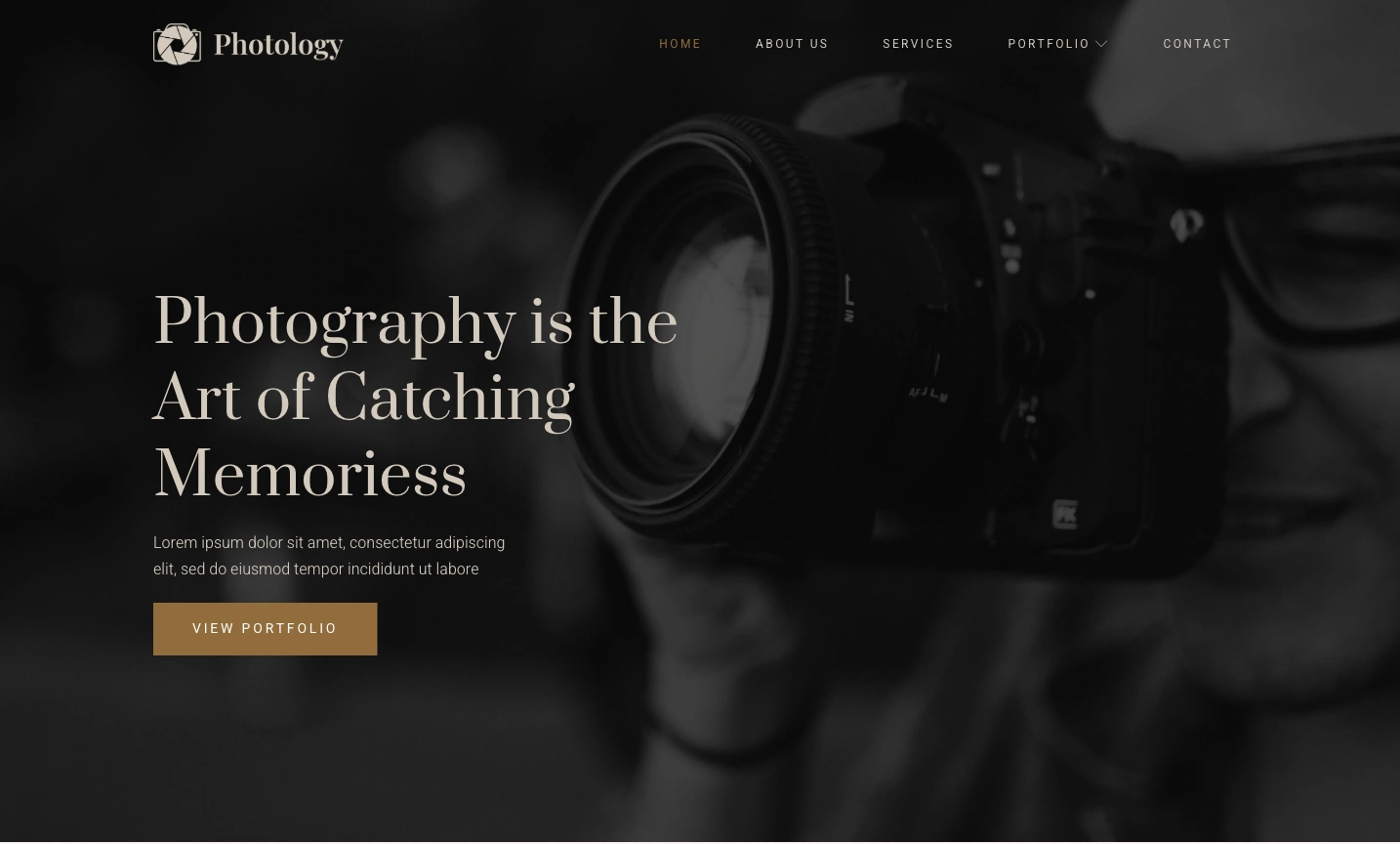
This free theme also supports Full Site Editing and works with Gutenverse, so you can customize your photography website with WordPress blocks. You can edit the homepage, header, footer, page layouts, templates, colors, images, and content directly in the WordPress Site Editor.
What is Included in Photology
Photology gives you a ready website structure for photography, portfolio, visual storytelling, and creative websites. You can start with a complete photography-focused layout instead of building every section from a blank page.
The hero section gives visitors a strong first impression. It includes a large image area, a photography-focused headline, and a View Portfolio button. You can replace the demo text with your own message, such as “Bali Wedding Photographer,” “Portrait Photographer for Creative Professionals,” or “Commercial Product Photography Studio.”
Below that, the front page includes a services section with sample cards for Wedding Photography, Event Photography, and Business Photography. You can use this section to explain what kind of photography services you offer. You can keep the sample categories or change them to match your real services, such as portrait sessions, fashion campaigns, product shoots, food photography, travel photography, or family sessions.
The portfolio section helps visitors browse your work more easily. The demo includes an “Our Latest Work” or “Portfolio” section with several image slots and category filters, such as All, Wedding, Fashion, Event, Personal, Business, and Product. This helps visitors find the type of work they want to see without scrolling through one long gallery.
Photology also includes testimonials and profile sections on the front page. The testimonials section helps you show client feedback. The team section lets you introduce the people behind the work. If you work alone, you can turn this section into an “About the Photographer” section. If you run a studio, you can use it to introduce your team members.
The footer also supports your portfolio website. It includes a logo area, social icons, quick links, contact information, and a Recent Works gallery. This gives visitors another chance to view your photos or contact you after they reach the bottom of the page.
Those sections give you a practical starting point. You can replace the sample content with your own photos, bio, service details, testimonials, location, and contact information before publishing your website.
Who Can Use Photology Theme?
Photology can be a good choice if you want to build a photography website with a design that already focuses on images, portfolios, and visual work. You can use it if you are a:
This theme can also help photographers who currently rely on Instagram, WhatsApp, referrals, or social media to show their work. A website gives you a more complete place to display your best photos, explain your services, share your photography style, and let potential clients contact you.
You also do not need to launch a big website right away. You can start with a homepage, a portfolio page, a contact page, and a few strong photo examples. As your photography work grows, you can add more galleries, service pages, project stories, testimonials, or blog posts over time.
If you are still not sure what to include in your portfolio, you can read this guide on how to create your portfolio website. It explains how to choose the right work, add context to your projects, and make your portfolio easier for visitors to trust.
How to Install Photology Theme
The installation process is simple and works the same way for both themes. You can install them through the Gutenverse dashboard or directly from the WordPress theme directory.
Option 1: Through the Gutenverse Dashboard
Option 2: Directly From WordPress
For a full step-by-step visual guide, WordPress.org check the Gutenverse theme installation guide.
Once you activate the theme, open the WordPress Site Editor and start replacing the demo content with your own. Add your company information, real project photos, construction services, and contact details. Since this theme already provides the main website structure, you can focus on customizing the content to match your business.
Need More Than Just a Front Page Template?
The free version of this theme is a good starting point. They give you a professionally designed front page template that you can customize, along with the standard WordPress block templates for other basic site areas.
But if you want a more complete website, Gutenverse PRO gives you access to the full template set for these themes. This includes ready-made templates for pages like About, Services, Projects, and Contact, all designed to match the same visual style as the front page.
This is a good option for agencies that want to build a full multi-page website faster. You can find more details on the Gutenverse pricing page.
FAQ
Yes. You can use Photology for free. Install it from your WordPress dashboard or download it from the official WordPress theme directory.
Photology is made for photography, portfolio, and visual storytelling websites. Photographers, photography studios, visual creators, photojournalists, and other creatives can use it to build an image-focused website.
Yes. You can pair Photology with Gutenverse Form to create inquiry forms for booking requests, project inquiries, collaboration requests, or general contact messages. This makes it easier for visitors to reach out after they view your portfolio, photography services, or contact information.
No. Photology is a block theme, so you can edit the design visually inside WordPress. You can replace text, images, colors, sections, and page content without writing code.
No. You can also use Photology for visual art portfolios, film projects, travel blogs, design portfolios, content creator pages, and creative studio websites.
Ready to Build Your Photography Website?
If you want to build a website for photography work, a visual portfolio, a photography studio, or a creative service, using a general theme can take more work. You may need to build the portfolio sections, gallery layout, profile area, and contact path from the beginning.
Fortunately, Photology gives you a clear starting point. It includes photography-focused templates, ready block patterns, responsive design, Full Site Editing support, and Gutenverse compatibility, so you can create a clean and professional photography website without coding.
Photology is a good option for photographers, portfolio websites, visual storytellers, and creative studios that need a free WordPress theme. You can download it from WordPress.org or explore the demo.